
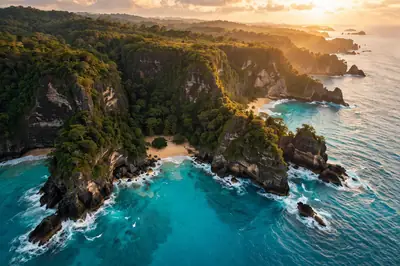
The cruelest thing about drone footage is the price tag — the drone itself, the permits, the travel, the crashed-into-a-tree replacements. AI quietly deletes all of that. What used to take a film crew and a week in the Amalfi Coast now takes one well-written prompt and a coffee break.
Below is that prompt, tuned for the smooth, gliding motion that makes aerial shots feel cinematic instead of nauseating. Pick your landscape, set one camera move per clip, and start building your travel film.
The Ready-to-Copy Prompt
Cinematic aerial drone flyover of [a tropical coastline at golden hour], smooth forward flight, turquoise water and dramatic cliffs below, golden sunlight, 4K cinematic, ultra smooth motion, 8 seconds
Negative prompt:
shaky camera, blurry, distorted, watermark, low quality, jerky motion
Using the Prompt Step by Step
- Pick your tool: Runway Gen-3, Luma Dream Machine, Pika, or Kling all excel at aerial motion. Start with a 5–10 second clip.
- Paste the prompt and replace the bracketed scene with your location.
- Set camera motion: “slow push-in”, “orbit”, or “top-down reveal” — drone videos live or die by smooth motion.
- Generate 2–3 takes. AI motion varies; pick the smoothest flight path.
- Stitch clips: Chain 3–4 flyovers with cross-dissolves for a full travel sequence.
Personalize Your Result
- Locations: “snowy mountain valley”, “desert dunes”, “city skyline at night”, or “waterfall in a jungle”.
- Time of day: “golden hour” and “blue hour” give the most cinematic light.
- Camera moves: “rising reveal” (upward), “orbit” (circular), “fly-through” (between cliffs/buildings).
- Speed: “slow majestic” for luxury; “fast dynamic” for energy.
- Weather: “morning mist” adds mystery; “clear day” adds punch.
3 Ready-Made Variations
1. The Coastal Epic
Drone flyover of [ Amalfi Coast cliffs], smooth lateral flight along the coastline, colorful villages below, sunset, cinematic, 8 seconds
2. The Mountain Reveal
Aerial rising reveal over [snowy Himalayan peaks], clouds parting, first sunlight hitting the summit, majestic, slow motion feel, 10 seconds
3. The City Night
Night drone orbit around [a glowing city skyline], lights reflecting on the river, smooth circular motion, cyberpunk energy, 8 seconds
Small Tweaks, Big Difference
- Smoothness is everything: Always include “smooth”, “stable”, “cinematic motion” — shaky AI footage looks amateur.
- One move per clip: Don’t ask for orbit + zoom + pan in one prompt; keep one camera move per generation.
- Longer is harder: 5–8 second clips are most reliable; extend by stitching, not by one long generation.
- Foreground: “flying past a cliff edge” adds depth and parallax — flat flyovers feel fake.
FAQ
Which AI video tool is best for drone shots?
Luma Dream Machine and Runway Gen-3 currently lead for smooth aerial motion. Try both — results vary by scene.
Can I use AI drone clips commercially?
Check your tool’s license — most paid plans allow commercial use. Free tiers often don’t.
Why does my footage look wobbly?
Add “ultra stable”, “smooth gimbal motion” and keep the camera move simple.
How do I make a full travel video?
Generate 4–6 clips of different locations, add music and cross-dissolves in CapCut — a 30-second travel film in an hour.
Continue Exploring: More AI Video Prompts
- Product Commercial Video Prompt: Your 15-Second Ad
- Talking Head Video Prompt: Your AI Explainer Video
- Music Video AI Prompt: Your Cinematic Music Video



3 Comments