
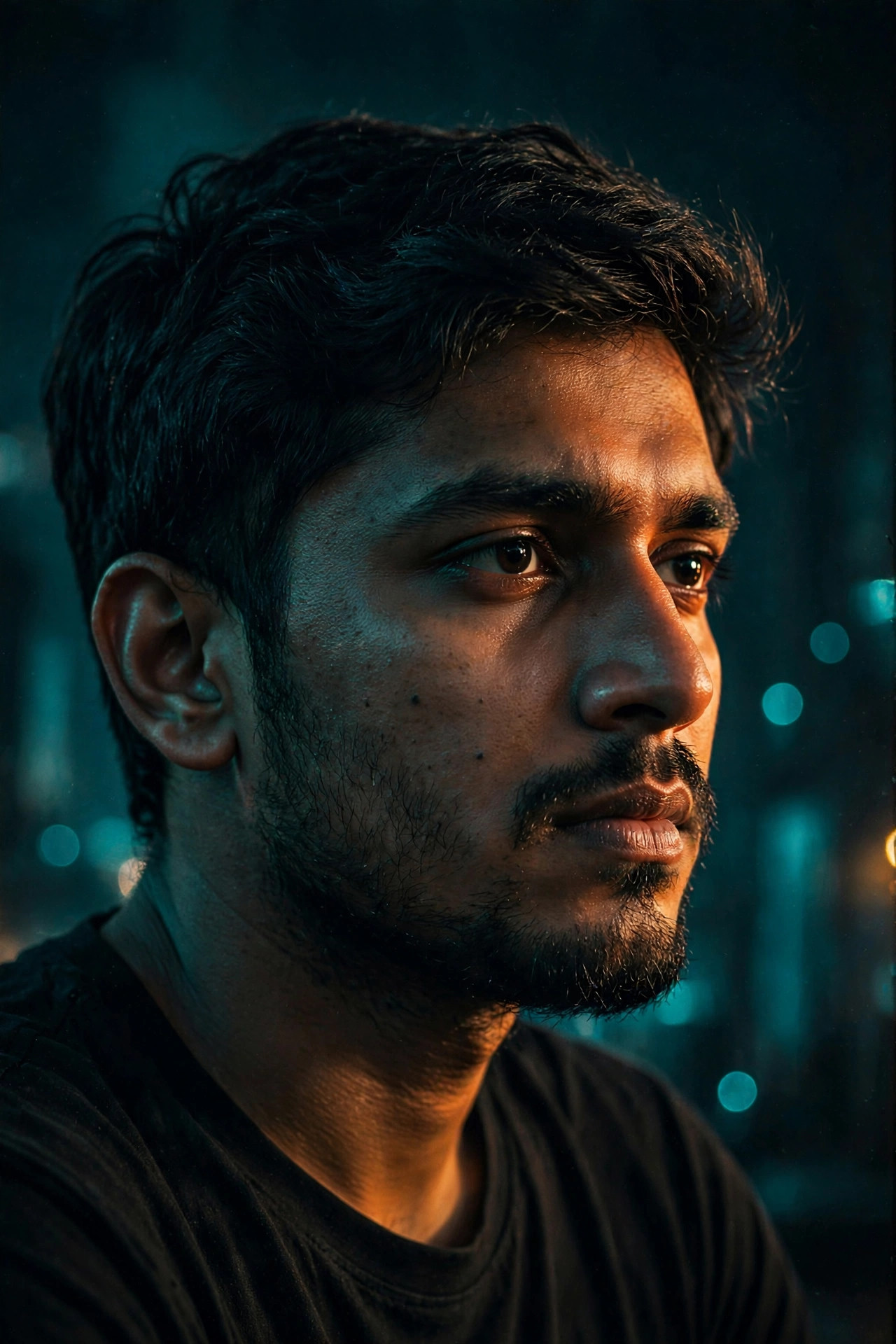
Some portraits look like a paused frame from a thriller — one side of the face lit, the background melting into soft lights. You don’t need a cinema camera or a lighting crew for that look. A well-written prompt does most of the work, telling the AI exactly how to shape the light, the grain, and the color grade.
Below is the exact prompt I use for this transformation, ready to copy and paste — plus which tools handle it best and how to tweak it so the result still looks like you.
Your Prompt, Ready to Go
Copy the block below, replace the text in [brackets] with your own details, and paste it into your favorite AI image tool:
cinematic movie-still portrait of [a young man in his late 20s with short black hair], dramatic side lighting sculpting the face, shallow depth of field, dark moody background with soft bokeh lights, subtle 35mm film grain, teal-and-orange color grade, ultra-detailed skin texture, photorealistic, 8k quality
Negative prompt (for Stable Diffusion / Midjourney):
cartoon, anime, blurry, distorted face, extra fingers, oversaturated, watermark, text
Putting This Prompt to Work
- Pick your best photo. Use a clear, front-facing photo with good lighting. The AI keeps your facial structure from this image, so avoid sunglasses, heavy filters, or group photos.
- Choose your tool. For face-swap style apps (Remini, PhotoAI, Fotor), upload your photo first, then paste the prompt. For text-to-image tools (Midjourney, DALL·E 3, Leonardo), describe yourself in the brackets as precisely as you can.
- Paste the prompt exactly as written, including the film-grain and color-grade phrases — those two details do most of the “cinematic” heavy lifting.
- Generate 3–4 versions and pick the one where your face looks most natural. AI faces vary slightly between generations.
- Fine-tune. If the lighting is too dark, remove the word “dark”; if the face looks too smooth, add “natural skin texture”.
Make the Prompt Your Own
- Change the era: Add “1940s film noir” for a black-and-white detective look, or “sci-fi thriller” for a futuristic vibe.
- Change the mood: Swap “dramatic side lighting” with “soft window light” for a romantic drama feel, or “harsh neon light” for cyberpunk cinema.
- Change the setting: Add “rainy city street at night” or “desert highway at sunset” after the background phrase.
- Match your features: Mention distinctive details — “with a beard”, “wearing glasses”, “long curly hair” — so the AI preserves what makes you recognizable.
- Aspect ratio: Use portrait orientation (4:5 or 9:16) for Instagram Reels and Stories; 16:9 works better for YouTube thumbnails.
Try These 3 Twists
1. The Action Hero
cinematic action-movie still of [a woman in her 30s with a ponytail], intense expression, dramatic rim lighting, explosion bokeh in dark background, 35mm film grain, teal-and-orange grade, photorealistic, ultra-detailed
2. The Romantic Lead
cinematic romantic-drama still portrait of [a young couple look-alike man], soft golden-hour light on face, blurred city lights background, gentle film grain, warm color grade, photorealistic, emotional expression
3. The Mystery Thriller
cinematic thriller movie still, close-up portrait of [a middle-aged man with stubble], half face in shadow, venetian blind light stripes, dark background, heavy film grain, desaturated cold tones, photorealistic
Getting Better Results
- Face consistency matters most. Tools with a dedicated “face ID” or “character reference” feature (like Midjourney’s –cref) keep your face far more accurate than pure text prompts.
- Don’t overdo the grade. If “teal-and-orange” looks too artificial on your skin tone, try “natural cinematic color grade” instead.
- Resolution: Generate at the highest resolution your tool allows, then downscale — this hides small AI artifacts in skin and hair.
- Free options: Leonardo.ai and Microsoft Designer (DALL·E 3) both have generous free tiers that handle this prompt beautifully.
Quick Answers
Will the AI photo really look like me?
It depends on the tool. Face-swap apps that start from your actual photo give the most recognizable results. Pure text-to-image tools approximate — the closer your bracket description, the better the likeness.
Can I use this for a professional profile picture?
A cinematic portrait is dramatic, which suits creatives, actors, and YouTubers. For corporate profiles, a classic headshot style works better.
Why does my generated face look blurry or warped?
Usually the input photo was low-resolution or angled. Use a sharp, front-facing photo at least 1024px wide, and add “sharp focus on face” to the prompt.
Is it okay to post AI portraits as if they were real photos?
For fun and creativity, absolutely. But don’t use them to misrepresent yourself in official documents or professional contexts where a real photo is expected.
Read Next: More AI Photo Prompts
- Studio Ghibli AI Photo Prompt: Become the Star of Your Own Anime Movie
- Cyberpunk Neon AI Photo Prompt: Your Photo, Straight Out of the Future
- Professional Headshot AI Photo Prompt: A Studio LinkedIn Photo Without the Photoshoot
Keep Reading
- Studio Ghibli AI Photo Prompt: Become the Star of Your Own Anime Movie
- Cyberpunk Neon AI Photo Prompt: Your Photo, Straight Out of the Future
- Professional Headshot AI Photo Prompt: A Studio LinkedIn Photo Without the Photoshoot
- Vintage 90s Film AI Photo Prompt: Give Your Selfie That Nostalgic Analog Look

5 Comments