
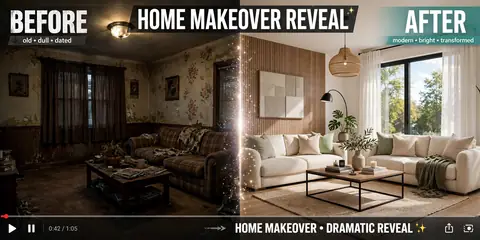
The before-and-after is the oldest trick in visual storytelling, and it never stops working because the human brain is a pattern-completion machine. Show it a sad beige room, then — snap — a bright modern space, and it rewards you with a hit of satisfaction and an involuntary share.
The prompt below stages that exact moment: dull room transforming into something you’d actually want to live in. Make the “before” as drab as possible (contrast is everything), use a swipe or finger-snap transition for the reveal, and add a budget number in text. “₹5,000 makeover” outperforms “luxury renovation” every time.
The Ready-to-Copy Prompt
Before/after home makeover video of [a dull old living room transforming into a modern bright space], dramatic reveal transition, satisfying transformation, warm lighting, inspiring, 4K, 10 seconds
Negative prompt:
blurry, distorted room, watermark, low quality, no change
Using the Prompt Step by Step
- Pick your tool: Runway Gen-3 or Luma. Image-to-video works great: before photo → AI generates the after.
- Start with a “before” image (even AI-generated) for maximum contrast.
- Paste the prompt describing the transformation style.
- The reveal: Use a hand-swipe or spin transition — the reveal moment is everything.
- Add cost/time text: “Budget makeover!” — numbers make it shareable.
Personalize Your Result
- Spaces: “kitchen”, “bedroom”, “balcony garden”, or “bathroom” — small spaces transform most dramatically.
- Styles: “modern minimalist”, “cozy boho”, or “luxury” — name the aesthetic.
- Transition: “finger snap”, “spin”, or “curtain pull” — signature reveals build brand.
- Budget angle: “budget makeover” content outperforms luxury — relatability wins.
- DIY steps: Show 2–3 quick steps between before/after for value.
3 Ready-Made Variations
1. The Budget Glow-Up
Budget room makeover video: [old bedroom] to [stylish cozy bedroom], paint and thrifted decor, inspiring, 12 seconds
2. The Kitchen Reveal
Kitchen transformation video: [outdated kitchen] to [modern white kitchen], dramatic before/after, satisfying, 10 seconds
3. The Garden Magic
Balcony garden makeover video: [bare concrete balcony] to [lush green paradise], plants and lights, dreamy, 10 seconds
Small Tweaks, Big Difference
- Contrast is king: The uglier the before, the more viral the after.
- Reveal timing: Tease the before for 3s, then BAM — the reveal.
- Save-bait: “Save for your future home” — saves boost reach.
- Music: Use the trending “transformation” audio.
FAQ
Why do makeover videos go viral?
Transformation triggers deep satisfaction — the brain rewards “before → after” with dopamine and a share.
Do I need a real home?
No — AI before/after concepts inspire real projects. Label as AI concept.
Best format?
Split-screen or swipe reveal, 10–15 seconds.
How do creators monetize?
Decor brand deals, affiliate links for products shown, and digital makeover guides.
Continue Exploring: More AI Video Prompts
- ASMR Video AI Prompt: Satisfying Videos That Hypnotize
- Life Hack Video AI Prompt: Clever Tricks That Get Shared
- Recipe Video AI Prompt: 60-Second Dishes That Crave Shares




One Comment