
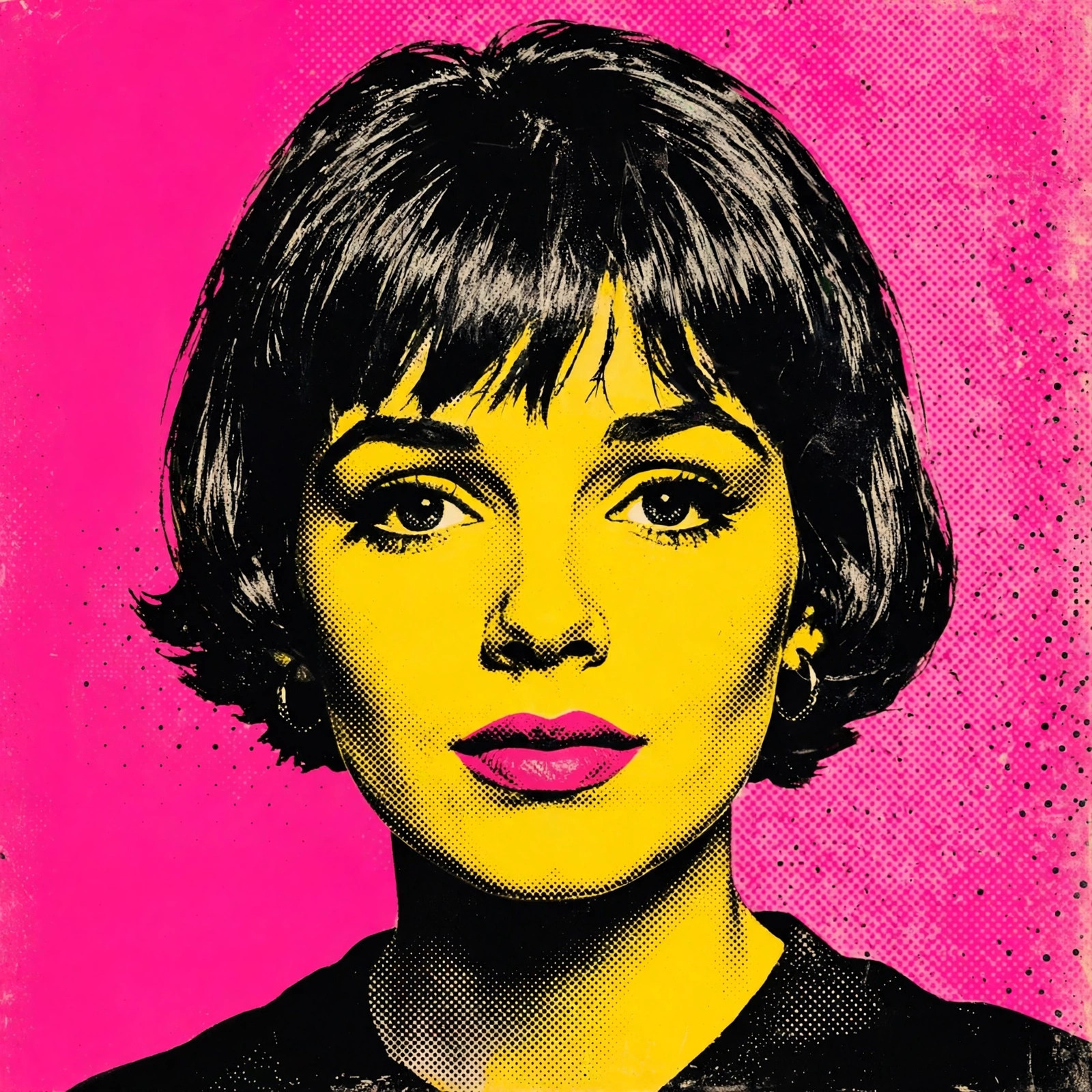
Warhol’s genius was making fame look fun — four bright panels, bold flat colors, and suddenly you’re an icon. Pop art portraits work brilliantly as profile pictures because they stay readable at tiny sizes, where detailed photos turn to mush.
The prompt below recreates the silkscreen look: high contrast, halftone dots, and punchy color combos. Copy it, keep your description simple — detail gets flattened anyway — and try a few color schemes before picking your favorite.
Copy the Prompt Here
pop art portrait in Andy Warhol style of [a young woman with short bob haircut], bold silkscreen effect, vibrant contrasting colors, hot pink background with yellow face, high contrast, halftone dots texture, 1960s pop art aesthetic, iconic, graphic
Negative prompt:
photorealistic, muted colors, blurry, distorted face, watermark, realistic shading, dull
How to Use It: A Quick Walkthrough
- Pick a bold, simple photo. Pop art flattens detail, so a clear headshot with a plain background converts best — busy backgrounds turn to mush.
- Use any AI image generator — Midjourney, DALL·E 3, Leonardo.ai, Stable Diffusion, or instant pop-art filters in apps like Picsart and Fotor.
- Paste the prompt and keep your bracketed description simple: hairstyle + one feature is enough. Detail gets lost in the style anyway.
- Generate 3–4 color versions. The magic of Warhol is the color combo — try several and pick your favorite.
- Make the classic quadriptych: Generate the same portrait in 4 different color schemes and arrange them in a 2×2 grid — the iconic Warhol Marilyn layout.
Tweak It Your Way
- Color combos that work: Pink/yellow, cyan/red, purple/lime, blue/orange. High contrast between face and background is essential.
- Try other pop artists: “Roy Lichtenstein comic style with Ben-Day dots and speech bubble” or “Keith Haring bold outlines” for different pop flavors.
- Halftone dots: The phrase “halftone dots texture” is what makes it read as authentic print pop art rather than just a colorful filter.
- Keep it graphic: If the AI adds realistic shading, strengthen with “flat colors, no gradients, screen print look”.
- Background: Solid bold color backgrounds work best — “electric blue background” or “hot pink background”.
3 Variations Worth Trying
1. The Marilyn Quadriptych
Andy Warhol style silkscreen portrait of [a woman with blonde hair], four-panel grid, each panel different bold color scheme, pink yellow cyan red, halftone dots, 1960s pop art, iconic
2. Lichtenstein Comic
Roy Lichtenstein pop art portrait of [a surprised man], comic book style, Ben-Day dots, bold black outlines, primary colors, speech bubble saying "WOW!", retro comic aesthetic
3. Neon Pop
modern pop art portrait of [a young woman with sunglasses], neon color palette, purple and lime green, silkscreen texture, bold graphic shapes, contemporary pop art, striking
Tips for the Best Output
- Simplicity wins. The #1 mistake is an over-detailed prompt — pop art is about reduction. Fewer words, bolder result.
- Face still matters. Even stylized, the portrait should be recognizable — if the AI drifts, add “preserve likeness”.
- Print potential: Pop art portraits make fantastic posters and phone cases — export at the highest resolution.
- Free instant route: Picsart and Prisma have one-tap Warhol filters that are genuinely good for quick results.
Common Questions
Why is pop art so popular for profile pictures?
It solves the “boring headshot” problem — it’s artistic, colorful, and readable even at tiny thumbnail sizes where detailed photos turn to mush.
Can I sell Warhol-style portraits of myself?
Portraits of yourself in a pop-art style are generally fine. Avoid replicating Warhol’s actual famous works or using celebrities’ likenesses commercially.
My result looks like a plain color filter, not pop art. Why?
You’re missing the print texture words. Add “silkscreen”, “halftone dots”, and “flat bold colors” — those three transform a filter into art.
Which is better: AI prompt or filter app?
Filter apps are faster and keep your likeness perfectly. AI prompts give more creative control over colors and composition. Try both.

4 Comments